WebP vs JPG vs PNG — Which Image Format Actually Wins in 2026?
WebP vs JPG vs PNG compared. Which format to use, the WhatsApp & government-portal traps, and how to convert free.
A common failure: a scholarship portal rejects every upload with a blunt "invalid file format" and no explanation, because the images are WebP.
Converting them to JPG takes two minutes. The whole mess comes down to one fact nobody mentions: WebP is not universally accepted, however good it is on paper.
What these formats actually are #
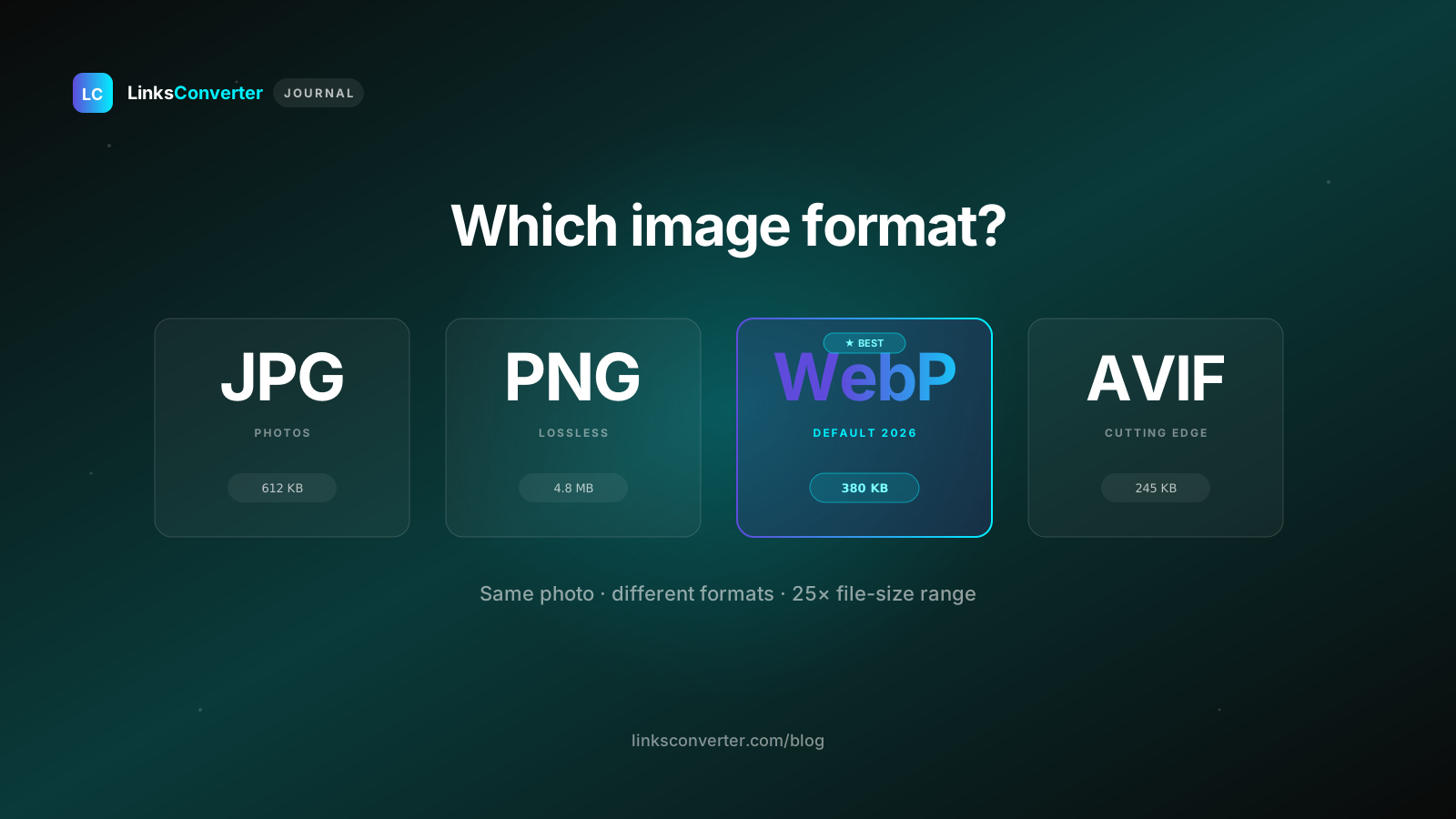
JPG (1992). Lossy compression that throws away the detail your eyes notice least. A good JPG of a photo looks almost identical to the original at around a tenth of the size. Every camera, phone, printer, and program understands it. No transparency.
PNG (1996). Lossless and pixel-perfect, with full transparency. That's why every logo and icon is a PNG. The cost is size: a photo as PNG is huge.
WebP (2010, from Google). Does both lossy and lossless, usually beating JPG and PNG at the same quality, and it supports transparency and animation. The catch shows up the moment you leave the browser, where support gets uneven.
Real file sizes #
For a normal 1920×1080 photo the usual pattern is: WebP around 180 to 220 KB, JPG at 85% quality around 280 to 380 KB, and PNG anywhere from 1.8 to 4.2 MB. So WebP runs about a quarter to a third smaller than JPG, and PNG is 5 to 15 times larger for photos. Which is exactly why nobody should store photos as PNG, and yet people do.
It flips for screenshots and anything text-heavy. PNG's lossless compression loves flat colour and sharp edges, while JPG smears ugly artifacts around text. So screenshots want PNG or lossless WebP. Photos want WebP or JPG.
The compatibility problem nobody mentions #
Blogs love to say "WebP works everywhere now." That's true in a browser and shaky outside one. Places WebP still trips up:
- Most Indian government and institutional portals, which list JPG and PNG only
- Older MS Office (2016, 2019), where dropping a WebP into Word or PowerPoint just fails
- Photoshop before the CC 2021 release
- Plenty of Android apps built on older SDKs
- Printers and print shops, which want JPG or TIFF
- Some corporate email clients with locked-down preview settings
JPG is not going anywhere. As long as these gaps exist, it stays the format files default to when they leave your hands. Use WebP on your website, and JPG when you're handing a file to someone else.
The Indian internet angle #
Format is not just a technical choice here, it is tied to how much data people have. On a slow connection, a 4 MB PNG sits on the upload spinner many times longer than a 300 KB JPG. A wedding photographer sending 200 JPGs at roughly 300 KB each moves about 60 MB. The same set as PNG would be over 800 MB. And the recipient feels it too, with WhatsApp download limits kicking in and previews refusing to load. Format choice is, quietly, an infrastructure choice.
WhatsApp, and what really happens to your image #
WhatsApp compresses everything. A 10 MB PNG and a 500 KB JPG both get squashed to roughly 100 to 200 KB on arrival. So:
- Casual photos: just use JPG, don't bother converting.
- Documents that must stay sharp: send them as a file (the attachment icon), which skips the photo compression.
- PNG is the worst pick for WhatsApp photos. You pay the size on your end and the other person still gets JPG-grade quality.
If someone needs a crisp image over WhatsApp, send it as a Document, not a Photo. That one habit settles most "why is the logo blurry" arguments.
Full comparison #
| Property | WebP | JPG | PNG |
|---|---|---|---|
| Compression | Lossy + lossless | Lossy only | Lossless only |
| File size (photo) | Smallest | Medium | Largest |
| Transparency | Yes | No | Yes |
| Animation | Yes | No | No |
| Browser support | All modern | Universal | Universal |
| Govt portal support | Rarely | Always | Usually |
| Print / offline software | Inconsistent | Universal | Universal |
| WhatsApp photos | Works, compressed | Best | Heavy loss |
| Best for photos | Yes (web) | Yes (everywhere) | No (too large) |
| Best for logos/screenshots | Yes (web) | No (artifacts) | Yes |
So which one, when? #
Reach for WebP when you run a website and control how images are served. Smaller files, faster loads, better Core Web Vitals. Let your CMS or CDN serve fallbacks for old browsers.
Reach for JPG when the file has to survive the real world: a government portal, a printer, an email to a stranger, a photo for a client. It is your safe default the moment a file leaves your device.
Reach for PNG when quality or transparency is the whole point: logos, brand assets, screenshots of text or UI, icons.
A common pattern: designers send JPGs when PNG would be right (a logo whose edges show up on a coloured slide), and non-designers send PNG when JPG would be right (an 8 MB photo bounced by a 5 MB form). Both wrong, opposite reasons. The whole skill is just: photo means JPG, logo means PNG, website means WebP.
How to convert WebP to JPG, free, in two clicks #
If you're here because a WebP just got rejected somewhere, the WebP to JPG converter is free, needs no account, and takes under 30 seconds:
- Go to linksconverter.com/convert/webp-to-jpg
- Drag your
.webponto the page - Click Convert
- Download the
.jpg
No watermark, and both files are deleted after two hours. If you also need to hit a tight size cap, like IRCTC's 50 KB photo limit, run the JPG through an image compressor afterwards.
Related tools #
Frequently asked questions
Is WebP better than JPG?
Why can't I open a WebP file on my Windows PC?
Does converting WebP to JPG lose quality?
Which format should I use for WhatsApp image sharing?
Can I upload WebP to DigiLocker or passport portals?
When should I use PNG instead of JPG or WebP?
Is AVIF better than WebP?
Free file converters & video downloaders
No sign-up, no watermark, no email. Convert and download files online, often within a minute.
Browse all converters